Summary
A purchase request gets approved by one manager but sits in another inbox for days. Finance asks for the same document again. Procurement isn’t sure whether approval already happened.
Nothing is technically broken but the workflow is unclear.
This is exactly the kind of problem business process modeling solves. Instead of relying on informal understanding, organizations visually map how work flows between teams, approvals, and systems.
By creating structured diagrams using BPMN models and process modeling software, businesses can clearly see how tasks move from start to completion. This clarity helps teams identify delays, remove unnecessary steps, and design processes that are easier to manage and automate.
In this guide, we explain business process modeling in simple terms, the most common notations and methods, and the business process modeling tools organizations use to design efficient workflows.
What is Business Process Modeling?
Business process modeling is the practice of visually representing how a workflow operates within an organization. It uses diagrams to show tasks, approvals, decision points, and the sequence of activities required to complete a process.
Organizations use standards like BPMN (Business Process Model and Notation) and modern process modeling tools to document workflows, identify inefficiencies, and prepare processes for automation or optimization.
Why Business Process Modeling Matters
As companies grow, processes become more complex. Tasks move across departments, systems, and approval layers.
Without clear documentation, teams often face:
- Approval delays
- Lack of workflow visibility
- Duplicate work
- Compliance risks
- Communication gaps between departments
Business process modeling tools help organizations solve these challenges by creating visual process maps that make workflows easier to understand.
Once a process is mapped clearly, organizations can improve governance, streamline approvals, and prepare workflows for automation platforms like business process management systems.
For example, organizations implementing structured workflows through bpm software integration often see faster approvals and improved process control.
Drive Digital Innovation & Transform Your Business
Struggling to find tailored IT solutions that truly accelerate your digital transformation journey? Partner with LedgeSure to unlock the true potential of technology.
At a Glance: Business Process Modeling
| Aspect | Explanation |
| Purpose | To visualize and improve business workflows |
| Common Standard | BPMN (Business Process Model and Notation) |
| Output | Workflow diagrams or process maps |
| Tools Used | Process modeling software and BPM platforms |
| Key Benefit | Improves operational efficiency and visibility |
Common Business Process Modeling Notations
Notations are the symbols used to represent different steps in a process diagram.
The most widely used standard is BPMN (Business Process Model and Notation).
BPMN provides a consistent way to represent workflows across organizations.
| BPMN Element | What It Represents | Example |
| Event | Start or end of a process | Customer submits request |
| Task | An activity performed in the workflow | Manager reviews request |
| Gateway | A decision point | Approved / Rejected |
| Sequence Flow | Direction of the workflow | Step progression |
| Pool / Lane | Department or participant | Finance / Procurement |
Because BPMN diagrams follow standardized symbols, both business teams and technical teams can understand the same process model easily.
| Did You Know? |
| Organizations that map processes before automation projects are far more likely to achieve successful digital transformation outcomes. |
| Clear process documentation helps reduce implementation errors and ensures technology aligns with real business workflows. |
Key Methods Used in Business Process Modeling
Different organizations use different modeling methods depending on process complexity.
Flowchart Modeling
Flowcharts are the simplest form of business process modeling.
They use basic shapes to represent steps and decisions.
Best for:
- Small teams
- Simple workflows
- Early stage process documentation
BPMN Modeling
BPMN models are the global standard for process modeling.
They provide detailed visual representation of workflows including:
- task sequences
- approval paths
- parallel processes
- decision gateways
Most enterprise process modeling software supports BPMN because it creates diagrams that both business users and developers can understand.
Value Stream Mapping
Value stream mapping focuses on identifying waste and inefficiencies in processes.
It is widely used in:
- manufacturing
- supply chain
- operational improvement initiatives
SIPOC Modeling
SIPOC stands for:
Supplier → Input → Process → Output → Customer
It helps organizations analyze workflows from a high level business perspective.
Empower Your Workforce with AI & Automated Innovations
Want to boost efficiency and reduce costs? Explore how LedgeSure’s AI-driven solutions simplify workflows and drive real outcomes.
Popular Business Process Modeling Tools
Modern organizations rely on digital business process modeling tools to design and maintain workflows.
These platforms help teams collaborate on process documentation and update workflows as business operations evolve.
| Tool | Best For | Key Capability |
| Ledgsure BPM Solutions | Enterprise process management | Workflow automation and process orchestration |
| Bizagi | BPMN diagram creation | Visual process design |
| Lucidchart | Workflow documentation | Drag and drop diagrams |
| Signavio | Enterprise process management | Process analysis and optimization |
| Microsoft Visio | Process documentation | Diagram creation |
Using process modelling tools helps organizations standardize workflows and prepare them for automation initiatives.
Businesses exploring process management tools often start with modeling workflows before implementing BPM platforms.
| Thought Leadership Insight |
| “You cannot improve a process that you do not understand.” — W. Edwards Deming |
This principle explains why process clarity is the foundation of operational improvement.
Before organizations automate workflows, they must first understand how the process works.
When Should Businesses Use Process Modeling?
Organizations should consider business process modeling when:
- Designing new workflows
- Preparing for automation initiatives
- Improving operational efficiency
- Standardizing processes across departments
- Documenting compliance procedures
Clear process models make it easier to implement AI automation for business processes and other digital transformation initiatives.
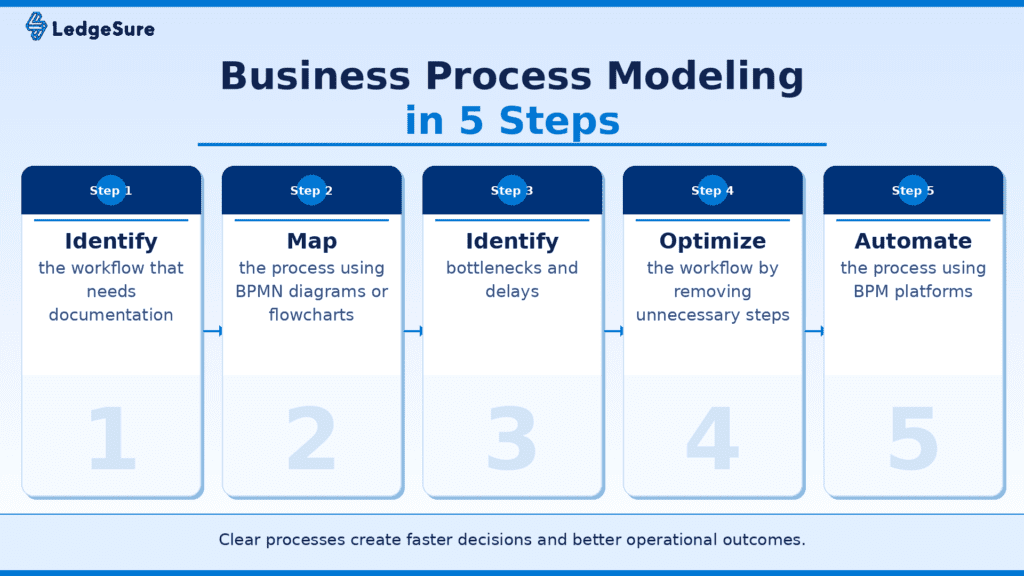
Conclusion
Business process modeling helps organizations understand how work actually moves across teams and systems.
By visually mapping workflows using BPMN models and process modeling software, businesses gain clarity into their operations and identify opportunities for improvement.
This clarity allows organizations to reduce delays, improve governance, and prepare workflows for automation.
Companies that invest in structured process modeling are better positioned to build scalable operations and drive long-term efficiency.
Ready to Transform Your Business Processes?
Mapping processes is only the first step. Real value comes when those workflows are automated and optimized across systems.
Ledgsure helps organizations implement business process management solutions that transform manual workflows into intelligent, automated operations.
Explore how Ledgsure can help you design scalable workflows and improve operational efficiency.
FAQs
Q: What is business process modeling?
A: Business process modeling is the visual representation of how tasks, approvals, and decisions flow through a business workflow.
Q: What is BPMN in business process modeling?
A: BPMN (Business Process Model and Notation) is a standardized method used to create workflow diagrams that represent business processes.
Q: What are business process modeling tools?
A: Business process modeling tools are software platforms used to create visual workflow diagrams and analyze business processes.
Q: Why is process modeling important before automation?
A: Process modeling helps organizations identify inefficiencies and optimize workflows before implementing automation technology.
Q: Which tools are commonly used for process modeling?
A: Popular tools include Bizagi, Lucidchart, Microsoft Visio, Signavio, and enterprise BPM platforms like Ledgsure.